A compliance platform is an excellent tracking system and a poor remediation engine. It tells you a control is failing. It does not go configure the control. That distance between the finding and the fix, is where most readiness projects stall.
Table of Contents
Open Table of Contents
- 1. The 94% problem
- 2. What a compliance platform actually measures
- 3. Four gaps that show up in almost every environment
- 4. Why this lands on the vCISO, not on the platform
- 5. Triage: what to fix first
- 6. A worked example: taking CC6.1 from red to defensible
- 7. What to do with this on Monday
- References
1. The 94% problem
There’s a moment in almost every SOC 2 readiness engagement that looks the same. The client bought Vanta, Drata, Secureframe or similar. They connected the cloud accounts, connected the IdP, installed the agent on the laptops they knew about, wrote the policies from templates, and the dashboard climbed to something like 94%.
Then the auditor’s request list arrives and the number stops meaning anything.
The failure isn’t the platform. These tools do exactly what they claim: continuously poll a set of APIs, compare the responses against a control library, and raise a task when a response doesn’t match. That’s genuinely useful and it replaced a spreadsheet that nobody updated. The problem is that a large share of the remaining 6%, plus a quiet portion of the 94%, needs somebody to open a terminal.
Compliance consultancies and vCISO firms tend to be staffed with people who are very good at scoping, risk assessment, policy, and auditor management. Their engagement stalls at the same place every time: the client says “the tool says our logging control is failing, can you fix it?” and the answer requires log pipeline design, not another advisory call.
This article is about where that gap opens up, and how to decide what to fix first.
2. What a compliance platform actually measures
It helps to be precise about the layers involved, because “compliant” gets used for all three of them interchangeably.
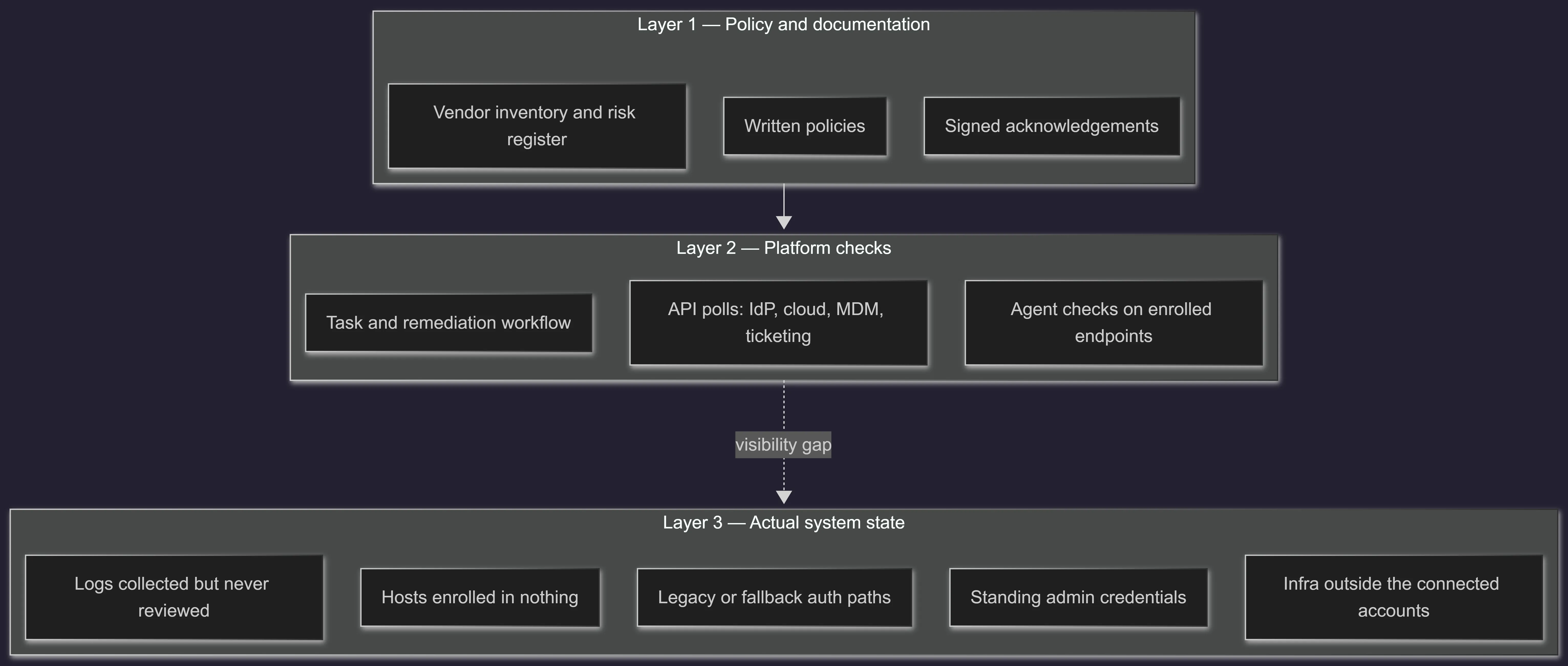
Layer 1 is what the platform manages best. Layer 2 is what it observes. Layer 3 is what an attacker interacts with, and it’s also what an auditor eventually gets to through sampling and inquiry.
The platform sees Layer 3 only through the specific integrations it has been given. A PASS therefore means “everything I can reach looks right,” which is a different statement from “this control operates effectively across the environment.” Most of the time the difference is small. When it isn’t, it tends to be large.
📋 Scope note This is not an argument against buying a compliance platform. Running a readiness program without one is worse. The argument is that the platform defines the boundary of the problem, and someone still has to work inside that boundary.
3. Four gaps that show up in almost every environment
3.1 Agent coverage is not fleet coverage
The endpoint control shows 100% because 41 of 41 enrolled devices are compliant. The population an auditor cares about is every device that accesses production or customer data — which is derived from HR records and the IdP, not from the MDM.
The reconciliation is unglamorous and it is where the finding lives:
# Three populations that should agree, and usually don't.
# 1. Users who should have a device
#    -> HR system / IdP active users

# 2. Devices actually enrolled
#    -> MDM export

# 3. Devices that have authenticated to production in the window
#    -> IdP sign-in logs, VPN logs, cloud console access

# The delta between (1)+(3) and (2) is your real finding.
Contractors, a founder’s personal laptop, a bastion host built during an incident and never decommissioned, an ex-employee’s device that never got wiped because offboarding was a Slack message. None of these appear on a dashboard that only knows about enrolled assets.
3.2 “MFA enforced” and “MFA cannot be bypassed” are different claims
The check queries the IdP for whether an MFA policy exists and whether users are enrolled. Both can be true while a bypass path is wide open:
- A break-glass account excluded from conditional access, with a password in a shared vault and no alerting on its use.
- Legacy authentication protocols still enabled on the tenant, which bypass modern policy entirely.
- Service accounts and CI tokens authenticating to production with a static secret, outside the human MFA path.
- Local accounts on a database or a jump host that never touch the IdP.
- SSO configured for the app but with the local login form still reachable at
/login.
Every one of those is a configuration change plus a verification. Not one is a policy edit.
3.3 Logging is enabled, and nobody has ever read it
CC7.2 in the Trust Services Criteria expects the entity to monitor system components for anomalies indicative of malicious acts, and ISO/IEC 27001:2022 splits the same idea into A.8.15 (logging) and A.8.16 (monitoring activities). The 2022 revision added A.8.16 as a new control, which makes the distinction explicit for organisations producing logs and calling it monitoring.
CloudTrail being on satisfies neither. The questions that follow are:
- Which sources are in scope, and how do you prove the list is complete?
- What happens when a source stops sending? Who finds out, and how fast?
- Which rules fire, at what severity, to whom?
- What’s the record that a human looked at an alert and made a decision?
That last one is the one auditors sample, and it’s the one that most often does not exist.
3.4 The access review that’s really a screenshot
A quarterly access review is a strong control and an easy one to fake. Somebody exports a user list from the admin console, pastes it into a sheet, a manager writes “approved” in a column, and it goes in a folder.
The auditor’s questions are about completeness of the population and the disposition of exceptions. Where did that list come from? Does it cover all in-scope systems or just the three with nice export buttons? Which entries were flagged, and can you show the removal ticket and the confirming system record? If the review found nothing in four consecutive quarters, that’s a signal too.
4. Why this lands on the vCISO, not on the platform
The economics are worth being blunt about. A compliance platform sells software with near-zero marginal delivery cost, so it stops at the boundary of what an API can assert. A vCISO firm sells a program, an auditor relationship, and a named security leader. Neither business model includes an engineer who will spend Tuesday afternoon rebuilding a log pipeline so it survives sampling.
So the remediation work gets pushed to the client’s engineering team, which is mid-sprint and treats compliance work as a tax. The readiness date slips. The consultancy takes the reputational hit for a delay it doesn’t control.
Two things fix this: making remediation an explicit priced workstream instead of an assumption, and having someone who does it.
5. Triage: what to fix first
Not every failing check deserves the same urgency. The useful axis isn’t CVSS or the platform’s own severity — it’s whether an auditor will sample the control across the observation window, and whether the gap is in configuration or in evidence.
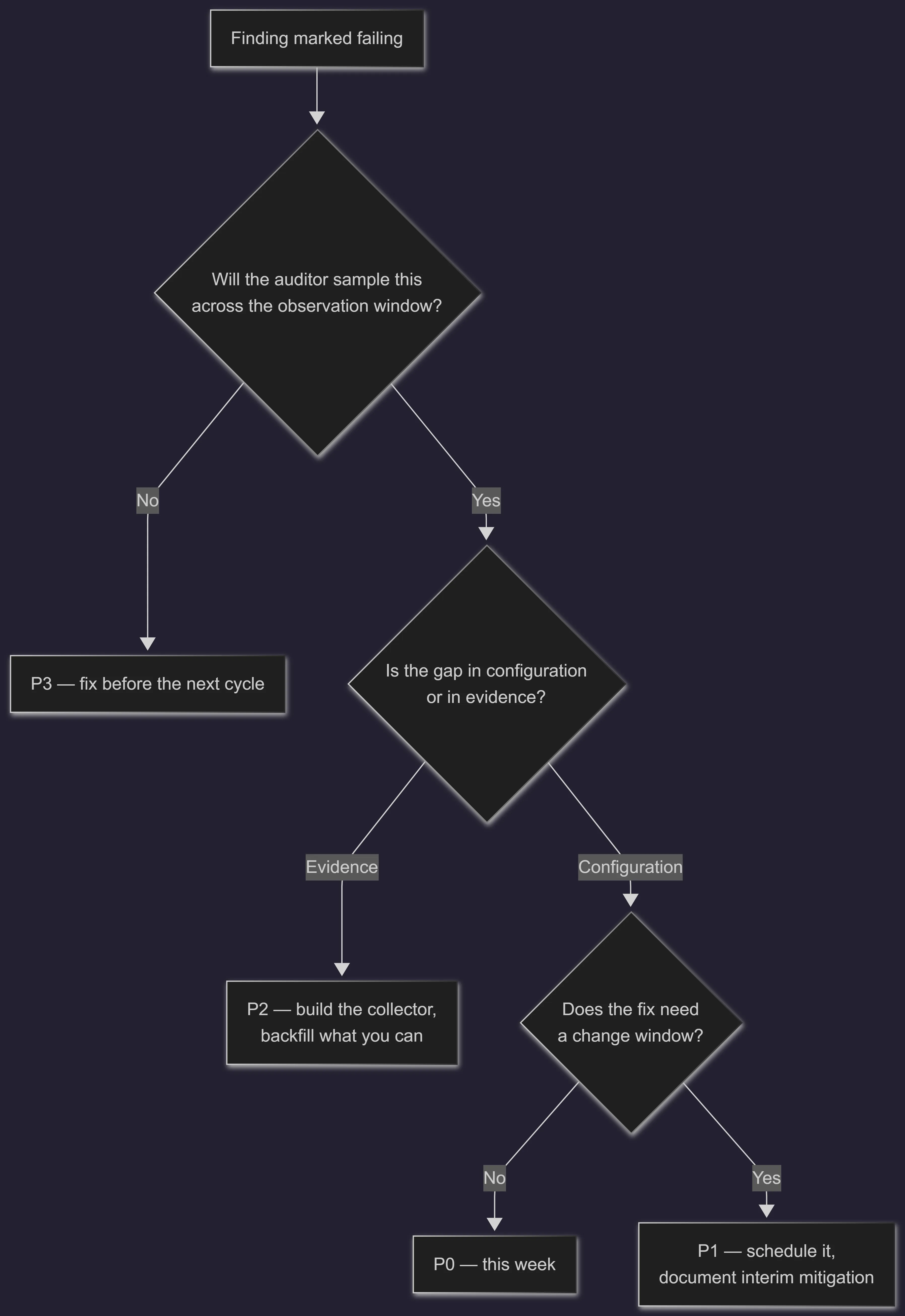
The evidence branch is the one with a deadline you can’t negotiate. A Type II report covers an observation window — commonly three to twelve months. A control that starts producing evidence in month five of a six-month window has five months of nothing, and no amount of engineering afterwards creates that history. Configuration gaps can be closed in an afternoon and the clock starts. Evidence gaps compound daily.
That single distinction reorders most remediation backlogs.
| Finding | Type | Priority | Why |
|---|---|---|---|
| No alerting on failed privileged logins | Evidence | P0 | Every day without it is a day of missing history |
| Legacy auth enabled on the tenant | Config | P0 | Bypasses the control the report will assert |
| Disk encryption unverified on 6 hosts | Config | P1 | Needs a maintenance window, easy to evidence after |
| No documented restore test | Evidence | P1 | One test creates the artifact, but it needs scheduling |
| Sudoers not scoped per service account | Config | P2 | Real risk, rarely sampled directly |
| Password policy 30 days shorter than policy doc | Config | P3 | Cosmetic mismatch, fix in the next cycle |
⚠️ The observation window is the constraint that actually governs the plan Before touching anything, get the audit type and window dates in writing. A Type I is a point-in-time design opinion, configuration wins. A Type II tests operating effectiveness over a period, evidence generation wins, and it should have started yesterday.
6. A worked example: taking CC6.1 from red to defensible
CC6.1 covers logical access security over protected information assets. Here’s what the path from a red check to something an auditor accepts actually contains.
Where it starts: the platform flags that not all users have MFA, and that two cloud accounts aren’t connected.
What’s really there, after an hour of looking:
# Cloud: which principals have console access without MFA?
until [ "$(aws iam generate-credential-report --query 'State' --output text)" = "COMPLETE" ]; do sleep 2; done
aws iam get-credential-report --query 'Content' --output text \
  | base64 -d \
  | awk -F',' 'NR==1 || (($4=="true" || $1=="<root_account>") && $8=="false") {print $1, $4, $8}'

# Cloud: access keys older than the rotation policy (90 days here)
aws iam get-credential-report --query 'Content' --output text \
  | base64 -d \
  | awk -F',' -v cutoff="$(date -u -d '90 days ago' +%Y-%m-%dT%H:%M:%S)" \
      'NR>1 && (($9=="true" && $10<cutoff) || ($14=="true" && $15<cutoff)) {print $1, $10, $15}'

# Linux: local accounts with a shell that never touch the IdP
awk -F: '$7 !~ /(nologin|false|sync|shutdown|halt)$/ {print $1, $3, $7}' /etc/passwd

# Linux: who can escalate, and to what
sudo grep -rvE '^\s*#|^\s*$' /etc/sudoers /etc/sudoers.d/ 2>/dev/null
Remediation: enforce MFA at the IdP with a documented and alerted break-glass exception; kill long-lived access keys in favour of federated roles or short-lived credentials; scope sudo per binary; disable local shells for service accounts; connect the two missing cloud accounts so the platform’s view matches reality.
Evidence produced, and this is the part that matters:
- A scheduled export of the MFA enforcement state for the full user population, not a screenshot of the policy page.
- An alert rule that fires on any authentication by the break-glass account, plus the ticket trail from each firing.
- A monthly credential report artifact showing key age across all accounts.
- The change tickets for every modification, with timestamps inside the window.
Same control. The first version is a checkbox. The second version survives a sample of three users chosen at random from a population the auditor derived independently.
7. What to do with this on Monday
If you run readiness engagements, three concrete moves:
-
Reconcile the population before trusting any coverage percentage. Pull the user list from HR, the device list from MDM, and the authentication list from the IdP for the same date. Every mismatch is a finding waiting to be found by someone else.
-
Split the remediation backlog into config and evidence, and start the evidence work first. Configuration is reversible on any timeline. History is not.
-
Decide explicitly who does the hands-on work. If it’s the client’s engineering team, get named owners and dates in the plan. If nobody is named, the plan is a wish.
The unglamorous truth of this work is that the standards are not the hard part. The Trust Services Criteria are readable in an afternoon and ISO 27001 Annex A is a list. The hard part is that “implement centralized logging with alerting and evidence of review” is one line in a gap assessment and roughly two weeks of engineering, and the gap assessment is priced as if it were the same size as “update the acceptable use policy.”
References
- AICPA, 2017 Trust Services Criteria (With Revised Points of Focus — 2022) — TSP Section 100, the actual criteria text behind SOC 2.
- ISO/IEC 27001:2022, Information security management systems — Requirements — Annex A control set, including A.8.15 and A.8.16.
- NIST, SP 800-92 Rev. 1 (draft), Cybersecurity Log Management Planning Guide.
- CIS, Critical Security Controls v8.1 — Controls 5, 6 and 8 map closely to the access and logging criteria discussed here.
- AWS, Generate credential reports for your AWS account — column definitions used by the credential report commands above.
- AWS, Security best practices in IAM — federation, temporary credentials and access key rotation.
- Microsoft Learn, Block legacy authentication with Conditional Access.
- Sudo project, sudoers(5) manual — command-scoped rules and file permissions.
Written by Pablo Huertas - Cybersecurity Specialist & Technical Writer
19 years in enterprise security operations and incident response management.